
This guide walks you through the steps to get your domain delegated to PTRDNS and your zone up and running.
1. Get a domain
PTRDNS is a DNS hosting provider: you bring the domains, we provide the nameservers. You will need a domain of your own to get started. Domains are typically available for a small yearly fee from any domain registrar; you may use tld-list.com to compare pricing across registrars for any given TLD.
2. Delegate the domain
Log in to your registrar's control panel and look for the nameserver settings — this is usually labelled "NS Servers", "Custom nameservers" or something similar, and is distinct from any built-in DNS zone editor the registrar may offer. Point the nameservers to the PTRDNS nameserver addresses shown in your account.
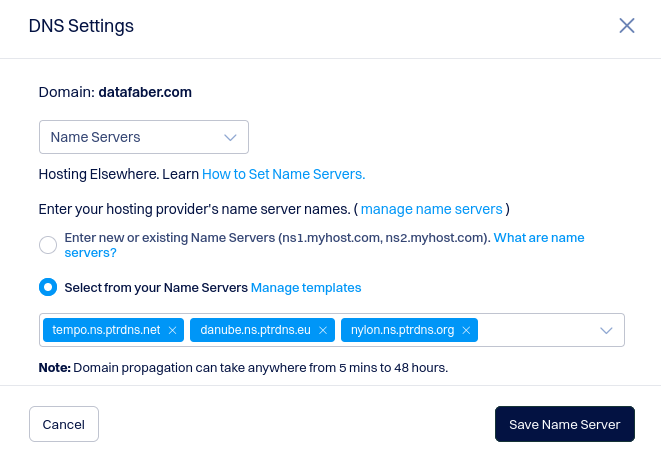
You can use any subset of the available PTRDNS nameservers; geographical location has little practical impact, since resolvers cache responses and rarely connect to authoritative servers directly. That said, delegate to at least two nameservers for redundancy reasons.
Delegation quirks
Depending on your registrar or TLD, you may run into one of the following situations:
- Some registrars require the nameservers to already respond correctly before the delegation is accepted. In that case, create the zone in PTRDNS first and add any required challenge TXT records before submitting the nameserver change.
- Some registrars require an exact match between the nameservers you specify and the NS records returned by those nameservers. If this happens, remove all NS records from your zone in PTRDNS except the ones you intend to register with the registrar.
- A number of registrars impose an undocumented limit on how many nameservers you can add. If the delegation fails, try reducing the number of nameservers (a minimum of two is sufficient).
3. Set up your zone
Once the delegation is in place, create your zone in PTRDNS and add the records you need. If this is your first time managing a DNS zone, here is a simple starting point:
- Add an
Arecord pointing to your server's IPv4 address. If your IP address changes frequently, take a look at the Dynamic DNS guide instead. - If your server also has an IPv6 address, add an
AAAArecord as well — dual-stack is always a good idea.
Moving from another provider
If your current DNS provider supports a BIND-compatible zone export (sometimes called "zone file export"), download
that file and paste its contents into the raw zone editor in PTRDNS. Make sure to remove any NS and
SOA records from the exported data before importing — keeping those would interfere with your zone's
correct operation on PTRDNS.
If your provider does not offer an export option, you will need to recreate your records manually, one by one.
4. Wait for TTL to expire
After submitting the nameserver change at your registrar, it typically takes between 6 and 12 hours for the delegation
to be visible across the internet, though in some rare cases it can take up to 24 hours or more. You can monitor progress
using whois and dig to check when the NS records start reflecting your PTRDNS nameservers.
Subsequent DNS changes will take effect much faster. The default TTL on PTRDNS zones is 3600 seconds (one hour), but you are free to lower it.
Ready to get started? Sign up for PTRDNS and have your domain delegated in minutes.