
A Secondary DNS (historically called "slave DNS") is an authoritative DNS server that maintains a read-only copy of your zone data. Its primary purpose is to provide redundancy and high availability: by keeping your zone data reachable on multiple independent servers, it ensures that resolvers can still access your records even if your primary DNS server experiences downtime or network issues.
The secondary receives its data from a primary DNS server (the "master") via a mechanism called a zone transfer. Unlike a primary server, a secondary does not allow direct record editing; it simply serves an exact replica of what's configured on the primary.
This synchronization happens through two main methods: AXFR (Full Zone Transfer), where the entire zone is copied, and IXFR (Incremental Zone Transfer), which only sends the changes made since the last update. To keep everything in sync in real-time, modern setups use DNS NOTIFY. Instead of waiting for the secondary to poll the primary (which could take hours depending on your SOA refresh timers), the primary sends a notification as soon as a change is saved, allowing the secondary to pull the update in seconds.
It's important to note that resolvers (and the end-users) do not make any distinction between primary and secondary servers. Both are listed at the domain registrar, and resolvers will choose which one to query based on response time and availability. This is why secondary DNS is a cornerstone of reliable infrastructure: it provides redundancy, protects against single-provider outages, and helps meet the requirements of many TLD registries (like .com or .org) that enforce having at least two independent nameservers.
Now that we've cleared up the terminology, it's time to let you know that PTRDNS supports both primary and secondary DNS zones in the same account, the only limitation being the number of zones in your plan. In this article, we'll see how you can configure a secondary zone at PTRDNS and have it served by our global network of nameservers.
Secondary DNS should be on a different network
RFC 1034 recommends that each domain should have at least two authoritative servers placed on different networks. This protects against network failures, datacenter outages, and even large-scale DDoS attacks. By distributing your DNS across multiple providers, you ensure that even if your primary server goes offline, your website, email, and APIs remain reachable.
A popular variation is the "Hidden Primary" (or Stealth Primary) pattern: you don't declare your primary server in your public NS records. By listing only the secondary servers (like PTRDNS) at your registrar, you keep your primary hidden from the public internet while the secondaries handle all the traffic. This is a favorite setup for self-hosting enthusiasts who want professional-grade resilience without exposing their home or office server.
How to configure a secondary DNS zone in PTRDNS?
Log on to your account at https://app.ptrdns.net and in the Dashboard click New TSIG Key, then choose a key name and algorithm:
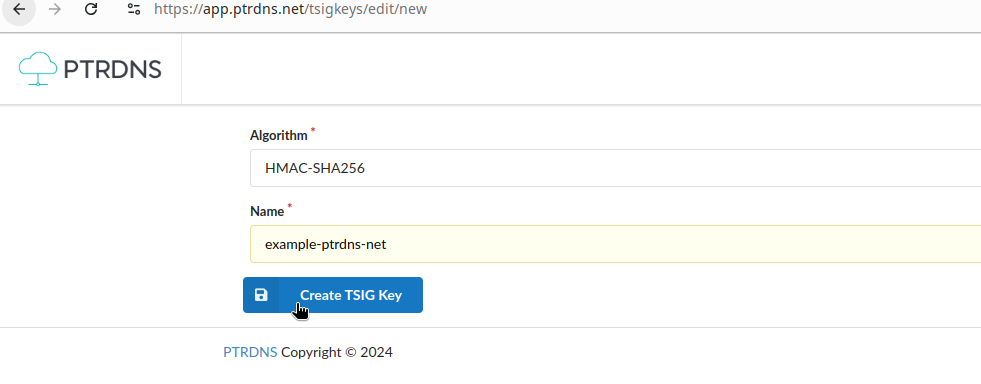
Once the key is created, copy its hash to the clipboard and save it somewhere, you will need to import it at your primary server.

Choose a primary DNS server, with a static IPv4 or IPv6 address, and decide which zone you want to transfer: let's use example.com
for this exercise. PTRDNS strongly recommends using TSIG keys to authenticate zone transfers between primaries and secondaries,
and to minimize the reliance on IP address based restrictions.
If you're using PowerDNS for your primary, you can use the following commands to generate a TSIG key and associate it to the zone:
$ pdnsutil import-tsig-key tsig.example.ptrdns.net \
     hmac-sha256 YaD+vIR5..............................
$ pdnsutil activate-tsig-key tsig.example.ptrdns.net \
     tsig.example.ptrdns.net primary
$ pdnsutil set-meta example.com \
     ALLOW-AXFR-FROM 0.0.0.0/0
The last line allows any IPv4 address to transfer your zone, but only if the remote address produces the TSIG key tsig.example.ptrdns.net.
If you prefer to restrict the IP address authorized to transfer your zone, you may put the IPv4 and IPv6 of intake.ns.ptrdns.net,
which are the IP addresses corresponding to the PTRDNS transfer intake servers.
Here's a minimal set of record that will work for our purposes:
example.com 3600 IN NS ns1.example.com.
example.com 3600 IN NS tempo.ns.ptrdns.net.
example.com 3600 IN SOA ns1.example.com hostmaster.example.com 0 10800 3600 604800 3600
Go back to the PTRDNS Dashboard, click on New Zone and create a secondary zone, specifying the IP address of your primary server and the TSIG key:
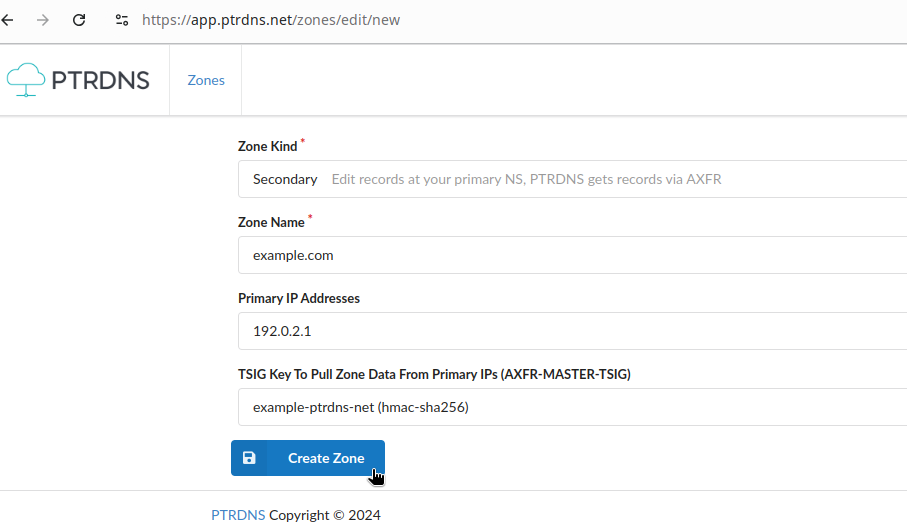
Save the changes and wait a few seconds for PTRDNS to pull the zone data from your primary, when this will be done you'll be able to see the zone data in the PTRDNS editor (but not to change them, since for PTRDNS this is a read-only copy).
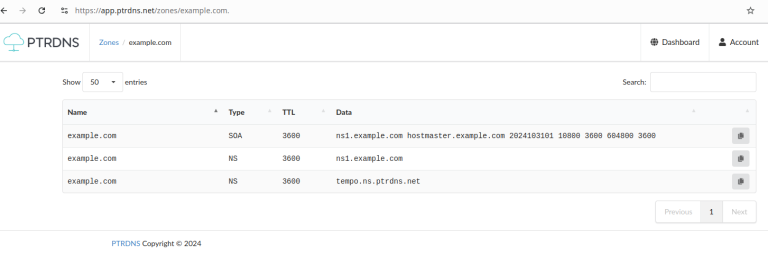
Don't forget to add NS records pointing to at least one of PTRDNS nameservers, and to enter the same nameservers at your registrar: this way, resolvers will know that both your primary and PTRDNS nameservers have an authoritative copy of the zone data.
Last thing: set up NOTIFY, so your primary can notify PTRDNS whenever there are changes in your zone and PTRDNS can pull them in a matter of seconds. If you don't do that, PTRDNS will still get the zone data but only every X minutes, the value of the REFRESH field in the zone's SOA record.
I hope you enjoyed this short article and that you've seen how easy it is to add secondary zones to your current setup. You can sign up for PTRDNS and enjoy all of these features, plus large query quotas, short TTLs and PowerDNS API support from 5 EUR per month.